

Sage 100 is a modular business management platform built for US small-to-mid-size companies — typically 10 to 199 employees — that have outgrown QuickBooks but aren't ready for enterprise ERP. This review covers its modules, pricing, strengths, weaknesses, and how it compares to QuickBooks Enterprise, NetSuite, and SAP Business One.
If your business has reached the point where QuickBooks slows down during month-end, where inventory is off by 5% too often, and where production scheduling lives in spreadsheets, you've likely encountered the midmarket software gap. On one side, SMB accounting products top out. On the other, enterprise ERP platforms demand seven-figure implementations. Sage 100 — formerly Sage MAS 90/200 — sits squarely in that gap, and has done so for US businesses for more than 30 years.
Today's Sage 100 is a modular business management system that covers core accounting, distribution, light manufacturing, payroll, business intelligence, and CRM. It's sold through a US reseller and implementation partner network, deployed on-premise or in cloud-hosted configurations, and priced based on the modules and user count you need.
Bottom line up front: Sage 100 is a strong fit for US businesses doing $5M–$100M in revenue that need deeper inventory, distribution, or light manufacturing capability than QuickBooks can deliver — without the six-figure implementation cost of NetSuite or SAP Business One. Its modular approach lets you buy what you need today and add modules as you grow. The trade-off: the user experience feels dated next to cloud-native ERPs, and most implementations require a partner.
What is Sage 100?
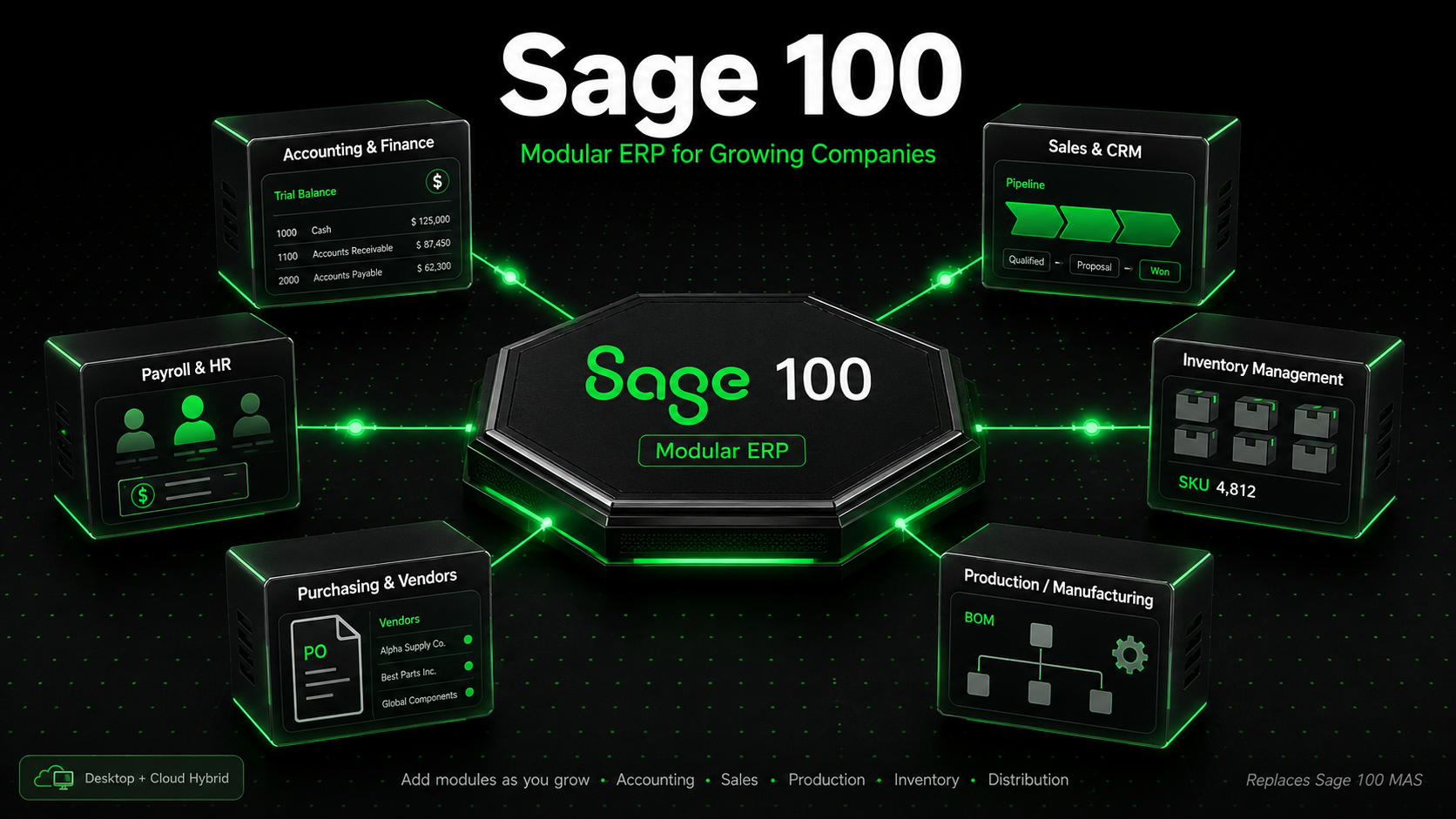
Sage 100 is a business management suite — functionally an ERP for small-to-midmarket businesses — that combines financial accounting, operations, inventory, manufacturing, payroll, and reporting into an integrated system.
It's available in two editions:
Sage 100 Standard — Single-entity, single-company deployments. Good fit for smaller distributors and manufacturers.
Sage 100 Advanced — Client/server architecture with broader multi-user scalability and support for remote users via Citrix or Remote Desktop.
Sage 100 Premium — Microsoft SQL Server–based for higher transaction volumes, larger user counts, and more demanding reporting requirements.
The platform has a long US heritage, originally as MAS 90 in the 1980s and MAS 200 in the 1990s, before being rebranded as Sage 100 in 2012. That heritage is both a strength (battle-tested, deep functionality) and a weakness (some of the UI still reflects its client/server origins).

Who Sage 100 is built for
Sage 100 fits US companies that match several of the following criteria:
Annual revenue between $5M and $100M
10–199 employees, often with 3–30 concurrent software users
Industry: wholesale distribution, light or job-shop manufacturing, industrial services, or specialty trades
Inventory-intensive operations with multiple warehouses, lot/serial tracking, or kitting
Teams that have hit the ceiling of QuickBooks Enterprise but can't absorb NetSuite's cost and complexity
Companies that prefer perpetual licensing or cloud-hosting via a partner, not a pure SaaS model
Sage 100 modules breakdown
The modular design is Sage 100's defining characteristic. You don't buy "Sage 100" — you buy the specific modules your business needs, and add more as you grow. The typical module catalog includes:
Module | Function | Typical buyer |
|---|---|---|
Core Accounting Required | General Ledger, Accounts Payable, Accounts Receivable, Bank Reconciliation | All customers |
Sales Management | Sales Order, Sales quotes, RMA, shipping integration | Distributors, wholesalers |
Inventory Management | Multi-warehouse, lot/serial tracking, reorder rules, kitting, bin locations | Distribution & manufacturing |
Purchasing & Purchase Order | PO workflow, receiving, vendor returns, drop-shipping | Inventory-heavy businesses |
Production Management | Bills of material, work orders, routing, WIP tracking | Light & job-shop manufacturers |
Payroll | In-house US payroll, direct deposit, tax filings, ACA reporting | Companies keeping payroll internal |
Business Intelligence & Reporting | Sage Intelligence Reporting (Excel-based), Crystal Reports, dashboards | Finance & operations leaders |
Custom Office / Customizer | Custom fields, UI customization, scripting | Businesses with unique workflows |
Paperless Office | PDF delivery of invoices, POs, statements; document archiving | All customers |
eBusiness Manager / Web integrations | B2B web portals, eCommerce integration | Distributors with online sales |
Note: Beyond the core modules, Sage 100 has a mature third-party marketplace with hundreds of ISV add-ons — EDI, advanced warehouse management, field service, manufacturing scheduling, credit card processing, and vertical-specific extensions. A qualified Sage partner can help you evaluate which native modules and which ISV add-ons are the right mix for your industry.
Deployment options
Sage 100 supports multiple deployment models:
On-premise — Installed on your own servers, licensed perpetually. Lowest long-term cost but requires IT overhead.
Cloud-hosted (partner-hosted) — A Sage partner hosts Sage 100 on their infrastructure; you access via remote desktop or browser-delivered app. Typical hosting fees are $100–$200 per user per month on top of the Sage subscription or maintenance.
Sage Partner Cloud on Microsoft Azure — Microsoft Azure–backed hosting through approved Sage partners, offering scalability and enterprise-grade infrastructure.
Note that Sage 100 is not a native SaaS product like Sage Intacct. If pure multi-tenant SaaS is a requirement, evaluate Sage Intacct or Sage X3 instead.
Sage 100 pricing
Sage 100 pricing is quote-based and varies significantly based on edition, modules, and user count. Typical US ranges reported by partners include:
Cost component | Typical range (USD) | Notes |
|---|---|---|
Subscription (per user/year) | ~$1,800–$3,500/user | Varies by edition and module mix |
Perpetual license (upfront) | ~$10,000–$60,000+ | Plus ~18–20%/yr maintenance |
Implementation & data migration | $15,000–$75,000+ | Depends on complexity |
Cloud hosting (per user/month) | $100–$200 | Partner-hosted option |
Training | $5,000–$20,000 | Typically 3–5 days on-site or virtual |
Annual total (10-user deployment) | ~$25,000–$60,000/yr | Ongoing cost estimate |
Pro tip: Sage 100 is almost always sold through a partner. Get quotes from at least two Sage-certified resellers — implementation quality varies more than the software itself, and pricing is often negotiable by 10–15%. Ask partners for references in your specific industry.
Strengths of Sage 100
Modular flexibility: Start with accounting and inventory; add manufacturing, BI, or eCommerce later. You're not paying for capability you don't use.
Deep inventory and distribution: Multi-warehouse, multi-bin, lot/serial, kitting, landed cost, and warehouse management integrations are mature.
Light manufacturing: Production Management supports bills of material, work orders, routings, and job costing. Third-party add-ons extend into full MRP and shop-floor control.
US heritage: Decades of US tax, payroll, and compliance updates. Strong partner ecosystem across North America.
Strong Sage Intelligence Reporting: Excel-based reporting that finance teams can actually use.
Customization: Custom Office and Customizer allow significant extension without altering core code.
Predictable total cost: Well below NetSuite or SAP Business One for equivalent functional scope.
Weaknesses of Sage 100
Dated UI: Though modernized in recent versions, the interface still reflects client/server roots and feels heavier than cloud-native ERPs.
Not native SaaS: True multi-tenant cloud requires moving to Sage Intacct or Sage X3.
IT overhead for on-premise: You'll need infrastructure, backups, patch management, and SQL Server administration (Premium edition).
Implementation partner required: Few businesses successfully self-implement. Budget for a certified partner and 3–6 months of implementation time.
Mobile experience: Limited compared to cloud-native ERPs. Mobile workflows typically depend on third-party add-ons.
CRM: Sage CRM integration is available but feels less polished than HubSpot or Salesforce alternatives; many customers keep CRM separate.
Sage 100 vs QuickBooks Enterprise vs NetSuite vs SAP Business One
Capability | Sage 100 | QuickBooks Enterprise | NetSuite | SAP Business One |
|---|---|---|---|---|
Target revenue | $5M–$100M | Up to ~$10M | $10M–$500M+ | $5M–$200M |
Deployment | On-prem + hosted | On-prem + hosted | Native SaaS | On-prem + hosted |
Inventory depth | Deep | Moderate | Deep | Deep |
Manufacturing | Light + job shop | Basic assemblies | Advanced (add-ons) | Strong |
Multi-entity | Limited | Limited | Native | Available |
Typical first-year cost | $40K–$120K | $2K–$10K | $50K–$250K+ | $40K–$150K |
Implementation timeline | 3–6 months | Weeks | 4–9 months | 3–9 months |
US partner ecosystem | Very large | Very large | Large | Moderate |
When to pick Sage 100 over QuickBooks Enterprise: You've hit QBE performance ceilings, inventory accuracy has become a real problem, you need multi-warehouse or lot/serial tracking, or you're starting to do light manufacturing. QBE handles basic distribution but doesn't match Sage 100's depth.
When to pick Sage 100 over NetSuite: Your operation is largely single-entity, you don't need native multi-subsidiary consolidation, your budget is under $100K first-year, and you prefer to own licenses or pair with a local partner instead of going pure SaaS.
When to pick NetSuite over Sage 100: You're multi-entity or international, you want native cloud, you expect rapid growth above $50M, or you need a unified ERP/CRM/eCommerce platform out of the box.
Integrations and ecosystem
Sage 100's integration story is mature but less slick than cloud-native ERPs. Common integration points include:
Sage CRM — Sage's own CRM, integrated with Sage 100 for quote-to-cash
Sage HRMS — For HR and payroll-heavy organizations
Credit card processing — Sage Payments Solutions and third-party gateways
eCommerce — Shopify, Magento, BigCommerce via partner connectors
EDI — SPS Commerce and other EDI partners
Warehouse management — Scanco, DataLinx, and other WMS add-ons
Shipping — StarShip, V-Technologies, and other shipping connectors
Power BI — Via data connectors and Sage Intelligence
Implementation guidance
A successful Sage 100 implementation typically follows this sequence:
Discovery and requirements (2–4 weeks): Partner maps your processes, selects modules, and sizes the deployment.
Infrastructure and installation (1–2 weeks): Server setup (on-premise) or partner-hosted environment provisioning.
Configuration (4–8 weeks): Chart of accounts, inventory structure, sales tax, payroll, user roles, forms.
Data migration (2–6 weeks): Customer, vendor, item masters, open transactions, historical data.
Training (2–3 weeks, often overlapping): Role-based training for accounting, operations, and admin users.
UAT and parallel run (2–4 weeks): Dual-running old and new systems, validating reports.
Go-live and hypercare (30–60 days): Cutover weekend and intensive support period.
Pro tip: The #1 predictor of Sage 100 implementation success is internal project ownership. Assign a dedicated internal project lead at roughly 50% capacity for the duration of the project. Implementations that rely entirely on the partner without internal ownership tend to slip and underdeliver.
Reporting, analytics, and business intelligence
Sage 100's reporting story has evolved significantly in recent releases. Out of the box, users get standard financial statements, aged receivables and payables, inventory valuation, sales analysis, and purchasing history. Beyond that, three primary tools drive analytics:
Sage Intelligence Reporting: Excel-based templates that finance teams can customize without IT help. Covers consolidated financials, cash flow, and variance analysis.
Crystal Reports: Long-standing standard for pixel-perfect custom reports — invoices, packing slips, statements, and specialized operational reports.
Sage Data & Analytics / Power BI connectors: For teams that want interactive dashboards and advanced visualizations, Sage 100 data can be surfaced through Power BI via direct connectors or data warehouse approaches.
The practical reality: most Sage 100 customers run their day-to-day reporting through Sage Intelligence and Crystal Reports, then layer Power BI on top for executive dashboards. That combination is usually sufficient through $100M in revenue, though businesses that expect heavy ad-hoc analytical workloads often complement Sage 100 with a dedicated data warehouse.
Is Sage 100 still relevant in the cloud era?
It's a fair question. The industry narrative favors native-SaaS ERP, and Sage itself has positioned Sage Intacct as the cloud-first option for growing companies. So where does Sage 100 still fit?
Three scenarios make Sage 100 the right choice in 2026:
Inventory- and manufacturing-heavy operations where Sage 100's distribution and production modules plus ISV add-ons still outpace Sage Intacct's inventory capability.
Businesses that prefer perpetual licensing and a local partner relationship over pure SaaS pricing models.
Existing Sage 100 customers with deep customization who don't yet have a compelling reason to migrate — Sage continues to release updates and has not announced end-of-life.
Final verdict
Sage 100 wins for US inventory-driven SMBs
If your business is a distributor, wholesaler, or light manufacturer in the $5M–$100M range, Sage 100 remains one of the best-value ERPs in North America.
Deep inventory, distribution, and light manufacturing functionality
Modular pricing keeps first-year cost well below NetSuite and SAP Business One
Huge US partner ecosystem and mature ISV marketplace
Scales comfortably to 50+ concurrent users
Sage 100 loses when native cloud is non-negotiable
If your CFO or board mandates a pure SaaS platform with multi-entity consolidation, Sage Intacct or NetSuite is a better starting point.
Overall: Sage 100 has earned its longevity by solving a real midmarket problem — deep operational depth at a fraction of enterprise ERP cost. It isn't the flashiest product on the shortlist, but for US distributors and light manufacturers in the $5M–$100M band, it remains one of the most rational choices. Evaluate it against NetSuite and Sage Intacct based on your deployment preferences, inventory complexity, and multi-entity needs — not on buzzwords.
This article is provided for informational purposes only and does not constitute accounting, tax, or technology advice. Pricing, modules, and deployment options referenced are based on publicly available information as of 2026 and may change. All product names — including Sage, Sage 100, Sage Intacct, Sage X3, QuickBooks Enterprise, NetSuite, and SAP Business One — are trademarks of their respective owners and used here for identification purposes only. Always request a current quote from an authorized reseller before making purchase decisions.

