

If you're running QuickBooks Desktop in 2026, the clock is already ticking. Intuit stopped selling new QuickBooks Desktop subscriptions in September 2024, QuickBooks Desktop 2023 support ends in May 2026, and 2024 support expires in May 2027. This guide compares Sage 50 and QuickBooks Desktop feature-by-feature, explains exactly what transfers in a migration, and gives you a practical timeline so you don't end up running unsupported accounting software during tax season.
Millions of US small businesses rely on QuickBooks Desktop today. Intuit's official position is that users should migrate to QuickBooks Online, but many QBD customers chose desktop software specifically because they wanted local data, faster performance on large files, and features — advanced inventory, deep job costing, batch entry — that don't map cleanly to QuickBooks Online's cloud architecture.
Sage 50 has positioned itself as the natural desktop-to-desktop alternative. It keeps the local-install model QBD users prefer, adds cloud access on top, and has an active product roadmap that isn't headed toward discontinuation. This article is a balanced migration-decision guide — we'll tell you when Sage 50 is genuinely the right choice and when QuickBooks Online, Xero, or Sage Intacct might be a better fit.
Bottom line up front: If you picked QuickBooks Desktop for its desktop performance, advanced inventory, or job costing — Sage 50 is the closest one-for-one replacement in 2026. Migration is realistic: lists and open transactions convert cleanly, though historical payroll and some multi-currency data won't move. Plan for a 60–90 day project, including parallel run. If you don't really need desktop anymore, consider QuickBooks Online or Xero instead.
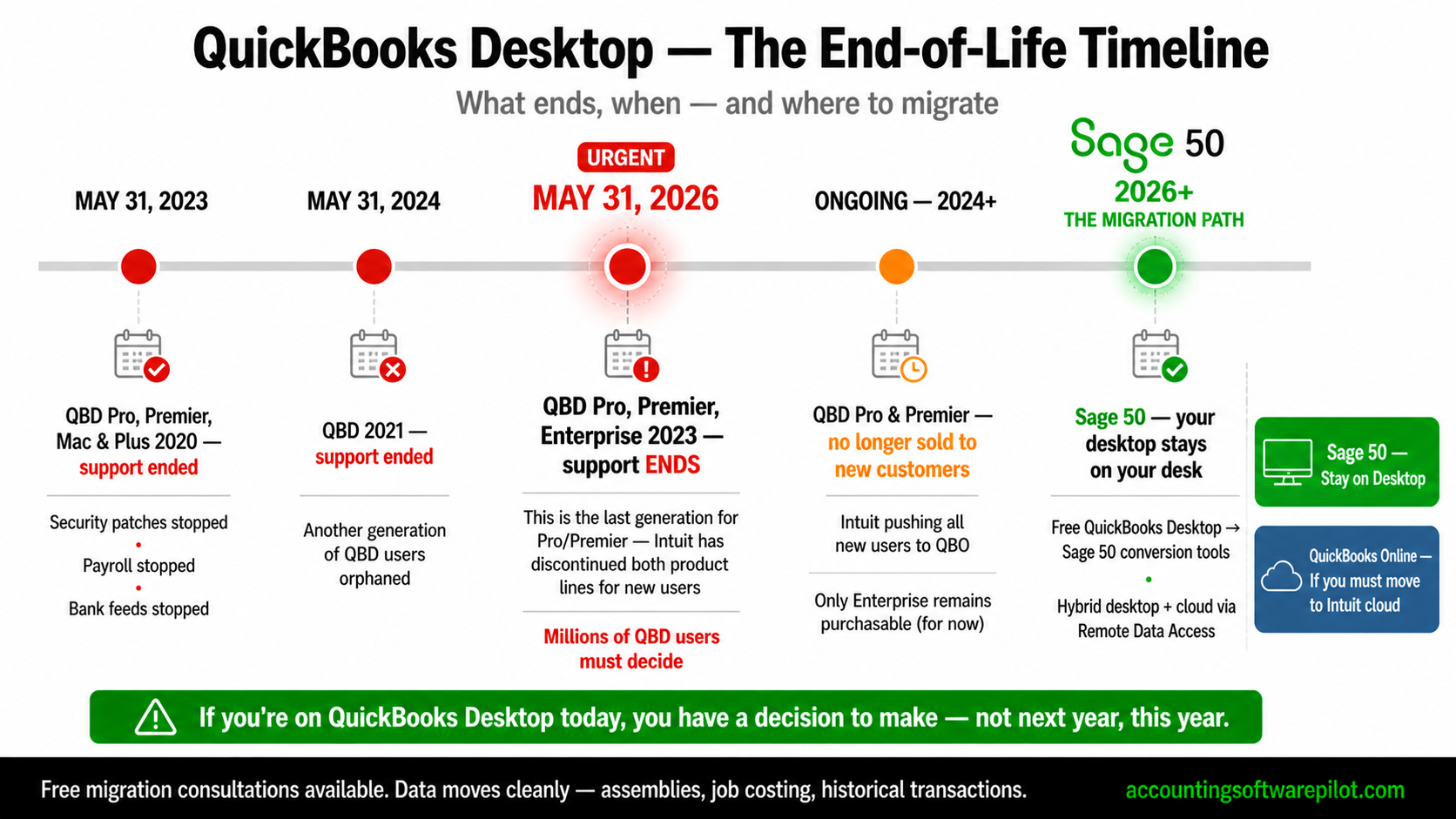
The QuickBooks Desktop end-of-life timeline
Understanding Intuit's support sunset is the first step in planning a migration. QBD versions lose access to live services (payroll, payments, bank feeds, security updates) on a fixed schedule after Intuit stops selling them.
QuickBooks Desktop version | New sales stopped | Service discontinuation | Action window |
|---|---|---|---|
QBD Pro/Premier/Mac 2022 | 2022 | May 31, 2025 (already off) | Migrate immediately |
QBD Pro/Premier/Mac 2023 | 2023 | May 31, 2026 | Migrate by Q1 2026 |
QBD Pro/Premier/Mac 2024 | Sept 30, 2024 (new subs) | May 31, 2027 | Migrate within next 18 months |
QuickBooks Desktop Enterprise | Still sold to existing subscribers | Year-over-year subscription | Plan ahead; no new non-subscription licenses |
The critical detail: "service discontinuation" doesn't just mean Intuit stops sending updates. It means payroll calculations stop, payments stop clearing, bank feeds stop, and — most dangerously — the software can no longer send secure data. Running discontinued QBD in production is a compliance and cybersecurity risk.
Note: QuickBooks Desktop Enterprise is still available to existing subscribers, but it's subscription-only and Intuit is no longer onboarding new Enterprise customers outside of limited channels. If you're thinking "I'll just upgrade to Enterprise and wait this out," confirm your eligibility first.
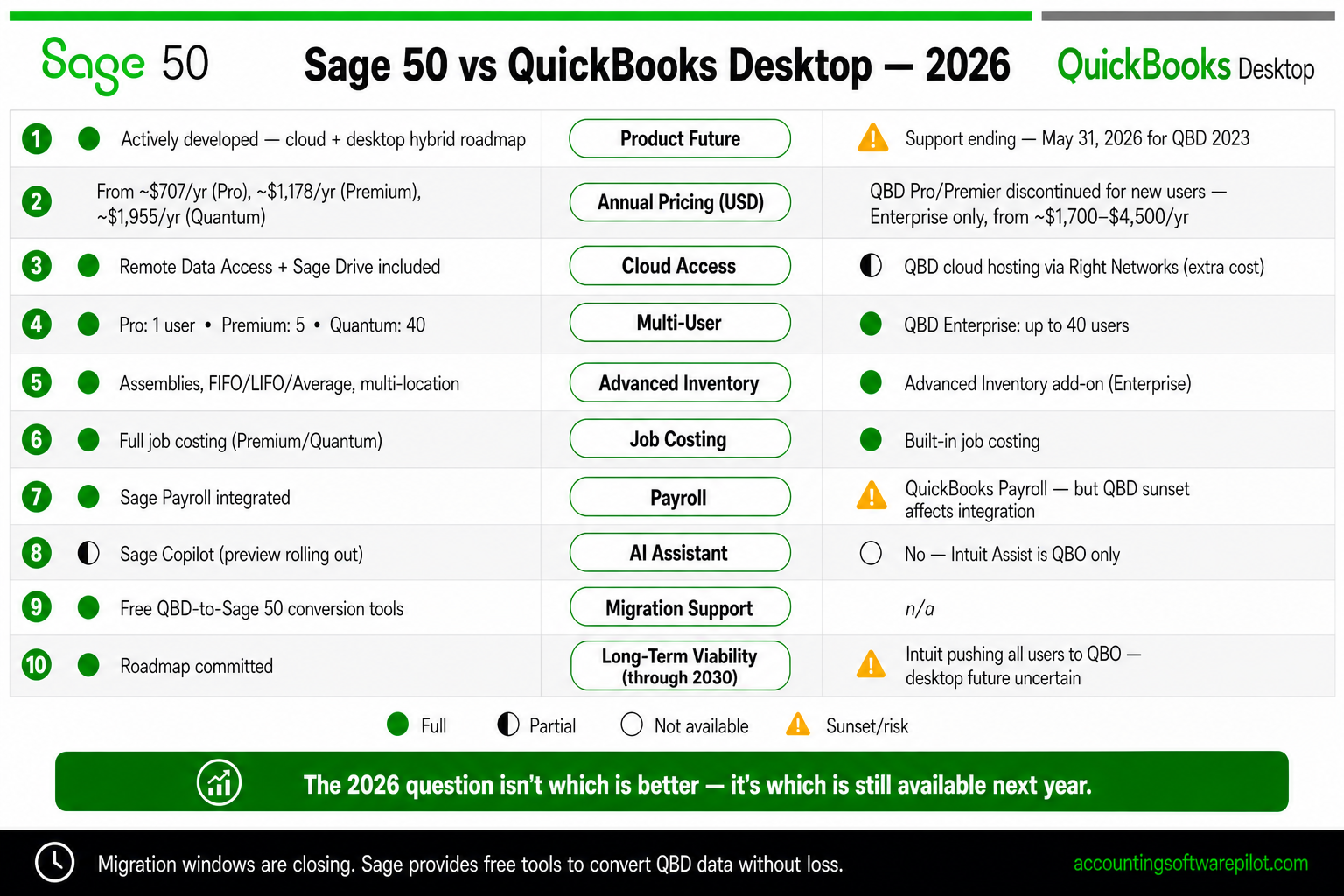
Sage 50 vs QuickBooks Desktop: feature comparison
For a straight feature-to-feature comparison, we benchmarked Sage 50 Premium against QuickBooks Desktop Pro Plus and Premier Plus — the two tiers most small businesses currently run.
Feature | Sage 50 Premium | QBD Pro Plus | QBD Premier Plus |
|---|---|---|---|
Deployment | Desktop + cloud access | Desktop only | Desktop only |
Future roadmap | Active development | End-of-life 2026 | End-of-life 2026 |
Max users | 5 (Premium) / 40 (Quantum) | 3 | 5 |
Advanced inventory (assemblies, serial) | Included | Not included | Included |
Multiple inventory costing methods | Avg, LIFO, FIFO, Specific ID | Average cost only | Average cost only |
Job costing | Phases + cost codes | Basic | Industry-specific editions |
Multi-company consolidation | Up to 10 companies | Separate files | Separate files |
Multi-currency (US edition) | Not supported | Supported | Supported |
Bank feeds | Included | Included | Included |
Remote multi-user access | Remote Data Access | Hosted desktop (add-on) | Hosted desktop (add-on) |
Ongoing subscription cost | From ~$62/month | No longer sold to new customers | No longer sold to new customers |
The one clear QuickBooks Desktop advantage in this comparison is multi-currency. Sage 50's US edition does not support multi-currency invoicing — a hard stop for exporters and import businesses. If that's you, you'll need Sage Intacct, QuickBooks Online Advanced, or Xero.
The migration path: QBD to Sage 50
Sage offers a dedicated QuickBooks-to-Sage 50 conversion tool that can move most of your data. The headline is that the tool is genuinely usable — this isn't a spreadsheet export and manual re-entry exercise — but it has clear limitations you need to plan around.
What transfers cleanly
Chart of accounts — account names, numbers, types and balances at conversion date
Customer list — names, contacts, terms, open invoices and credit memos
Vendor list — names, contacts, terms, open bills and 1099 flags
Employee list — basic records (pay history limitations below)
Item list — products, services, inventory parts with quantities and average costs
Open transactions — unpaid invoices, bills, open purchase orders, sales orders
Beginning balances — as of the conversion date
What does not transfer
Historical transactions — closed invoices, bills, journal entries older than a certain cutoff typically do not transfer line-by-line; balances roll up into opening balances
Payroll history — YTD payroll data must be re-entered manually or imported via CSV, and prior-year payroll stays in your archived QBD file
Reconciliation history — prior bank reconciliations do not transfer; you'll start fresh
Memorized reports and custom templates — rebuilt in Sage 50's report designer
Multi-currency transactions — not supported in the US edition, as noted above
Attachments — documents attached to QBD transactions typically don't migrate
Budgets — re-enter in Sage 50
Pro tip: Always keep your final QBD company file on a read-only archive after migration, along with a running installed copy of the QBD version you used. You'll likely need it for at least three years of IRS audit lookback, for payroll year-end questions, and for historical reporting.
Migration checklist and timeline
A disciplined QBD-to-Sage 50 migration takes 60–90 days if you do it right. Rushing compresses the parallel-run period and causes avoidable errors. Here's a practical project plan.
Phase | Duration | Key activities |
|---|---|---|
1. Planning | Weeks 1–2 | Choose Sage 50 tier, confirm users, pick conversion date (typically start of fiscal quarter or year), identify Sage reseller or accountant partner |
2. QBD cleanup | Weeks 2–4 | Reconcile all bank accounts, close open transactions you can, verify customer/vendor lists, back up QBD file in multiple formats (QBB, QBW, portable) |
3. Sage 50 setup | Weeks 4–6 | Install Sage 50, run conversion tool, verify balances against QBD trial balance, set up bank feeds, rebuild memorized reports |
4. Parallel run | Weeks 6–10 | Enter transactions in both systems for 30 days; reconcile outputs monthly; train users |
5. Go-live | Week 10+ | Cut over fully to Sage 50; archive QBD file; document processes; monitor for 60 days |
Why Sage 50 over QuickBooks Online?
Intuit would prefer you migrate from QBD to QuickBooks Online. For many businesses, that's actually the right call. But there are genuine reasons desktop QBD users should consider Sage 50 instead of QBO.
You want to stay on desktop. If you chose QBD because you prefer local data and desktop speed, Sage 50 preserves that choice. QBO is cloud-only.
You have advanced inventory needs. QBO only offers real inventory depth in the Advanced tier (~$235/month), and even then it's lighter than Sage 50 Premium.
You run job costing. Sage 50's job costing matches or exceeds QBO Plus and is meaningfully cheaper.
You need multi-company consolidation. Sage 50 Premium consolidates up to 10 companies. QBO requires a separate subscription per entity.
You want to own your data locally. Data residency, backup control, and offline availability are all stronger with Sage 50.
Your accountant knows Sage. The Sage Accountants Network is smaller than Intuit's but deep in industries like construction and distribution.
When QBO might actually be the better choice: You have fewer than 5 users, no advanced inventory, no job costing, and your team is already mobile-first. QBO's ecosystem is larger, its mobile app is more mature, and its integration marketplace is the biggest in the category. Don't force a desktop migration if your business has quietly become cloud-native.
Cost of migration: budget estimate
A typical QBD-to-Sage 50 migration for a 3-person bookkeeping team with moderate transaction volume breaks down roughly like this:
Cost category | Estimated range (USD) |
|---|---|
Sage 50 Premium subscription (year 1, 3 users) | $2,500–$3,800 |
Conversion tool (often bundled or free) | $0–$500 |
Sage reseller/partner implementation | $1,500–$6,000 |
Training (6–12 hours) | $600–$1,800 |
Internal staff time (40–80 hours) | Varies |
Total first-year budget | $4,600–$12,000 |
That's meaningfully higher than a pure QBO migration (which Intuit heavily subsidizes for QBD switchers), but for most desktop-committed businesses the feature match and ongoing fit make Sage 50 the stronger long-term value.
You don't have to go cloud if you're not ready
A lot of the marketing noise around QuickBooks Desktop's sunset frames cloud migration as inevitable. It isn't. Plenty of US small businesses are legitimately better off on desktop software in 2026 — regulated industries, firms with unreliable internet at job sites, businesses with in-house bookkeepers who work faster on desktop software, and owners who simply prefer local control of their books.
Sage 50 exists for exactly those buyers. The product has an active roadmap, it ships regular updates, and it increasingly leans on cloud services (Remote Data Access, cloud hosting, Microsoft 365 integration) to meet remote-work requirements without abandoning the desktop core. If the only reason you'd migrate to QBO is because you think you "have to," step back and look at Sage 50 first.
Pro tip: Before committing to any migration path, run the Sage 50 conversion on a copy of your QBD file 90 days before your deadline. The dry run tells you what actually transfers for your specific data, where cleanup is needed, and how much retraining your team will realistically need.
Decision framework: pick your path
Choose Sage 50 if:
You want desktop-first accounting with optional cloud access
You use advanced inventory, assemblies, or multiple costing methods
You run job costing for construction or project work
You have 2–10 related companies to consolidate
Your team works primarily from a fixed office on Windows PCs
Choose QuickBooks Online if:
You're ready to embrace cloud and mobile workflows
You have fewer than 5 users and simpler inventory
You already lean on the huge QuickBooks third-party ecosystem
Your accountant is QuickBooks ProAdvisor-certified
Consider Sage Intacct or NetSuite if:
You have 5+ entities or complex consolidations
You need revenue recognition (ASC 606), project accounting, or real-time dashboards
You're crossing $10M revenue or 50+ employees
You need AICPA-preferred financial reporting and audit-ready controls
Final verdict
QuickBooks Desktop's end-of-life is a forcing event, not an opportunity to over-engineer a software change. If QBD met your needs, the right migration target is usually the one that preserves what you liked — and for most desktop-committed US small businesses, that's Sage 50. It converts cleanly enough from QBD data, keeps the desktop paradigm you chose originally, and adds cloud access where you need it.
Overall: For QuickBooks Desktop users who want to stay desktop-first, Sage 50 is the strongest migration target in 2026 — especially for inventory and job-costing businesses. Start your project 6–9 months before your QBD version's service discontinuation date, run a conversion dry run early, and budget for parallel-run and retraining. If you're genuinely ready for cloud, QuickBooks Online or Xero may serve you better; if you've outgrown entry-level accounting entirely, jump to Sage Intacct.
This article is for informational purposes only and does not constitute financial, tax or legal advice. Pricing, features, and product support timelines are subject to change — always confirm current specifications with Sage, Intuit, or an authorized reseller before making a migration decision. QuickBooks, QuickBooks Desktop, QuickBooks Online and Intuit are trademarks of Intuit Inc. Sage and Sage 50 are trademarks of The Sage Group plc. Other trademarks are the property of their respective owners.

