

Sage 50 remains one of the most capable desktop-first accounting platforms available to US small businesses in 2026 — a practical middle ground between legacy on-premises software and pure cloud tools, with advanced inventory, job costing and secure cloud access baked in. This review breaks down the three tiers (Pro, Premium, Quantum), pricing, standout features, integrations, and who should actually buy it.
With QuickBooks Desktop officially sunsetting — Intuit stopped selling new subscriptions in September 2024 and is phasing out support for older versions through 2026 and 2027 — millions of US small businesses are actively shopping for a desktop-capable replacement. Sage 50 has emerged as one of the clearest contenders, particularly for inventory-heavy firms, construction contractors and owner-operated businesses that rely on an in-house bookkeeper.
We spent several weeks testing Sage 50's current release across a sample construction company and a light manufacturing file, examining workflows, reporting, the Sage Drive cloud-hosting layer, and the partner marketplace. This review is balanced: Sage 50 is not the right fit for every business, and we call out where it lags behind cloud-native competitors like Xero and QuickBooks Online.
Bottom line up front: Sage 50 is the strongest desktop-plus-cloud accounting option for US small businesses that want deep inventory, job costing, and local control without giving up remote access. Pro (from ~$62/month) covers core bookkeeping; Premium adds advanced budgeting and multi-company consolidation; Quantum is built for teams of up to 40 users. If you're a departing QuickBooks Desktop user, Sage 50 is the most natural replacement on the market.
What is Sage 50?
Sage 50 (formerly Peachtree) is a desktop-installed accounting application with optional cloud hosting and a connected web services layer. Unlike pure SaaS products such as Xero or QuickBooks Online, the core application runs locally on Windows PCs — which means faster data entry on large files, offline capability, and a more robust feature set for inventory, job costing and manufacturing light. Sage then layers cloud access on top through Remote Data Access (formerly Sage Drive) and Microsoft 365 integration.
That hybrid architecture is the product's entire value proposition in 2026. Firms that tried migrating from QuickBooks Desktop to a fully cloud tool often hit friction with transaction speed, inventory depth, or reporting flexibility. Sage 50 keeps the desktop feel while modernizing the collaboration story.
Sage 50 pricing and tiers in 2026
Sage 50 is sold in three tiers in the US — Pro Accounting, Premium Accounting and Quantum Accounting — all billed as annual subscriptions that include updates, tax table updates, and support. Pricing below is indicative; always confirm current promotional rates on the Sage website, since Sage frequently runs multi-year and multi-user discounts.
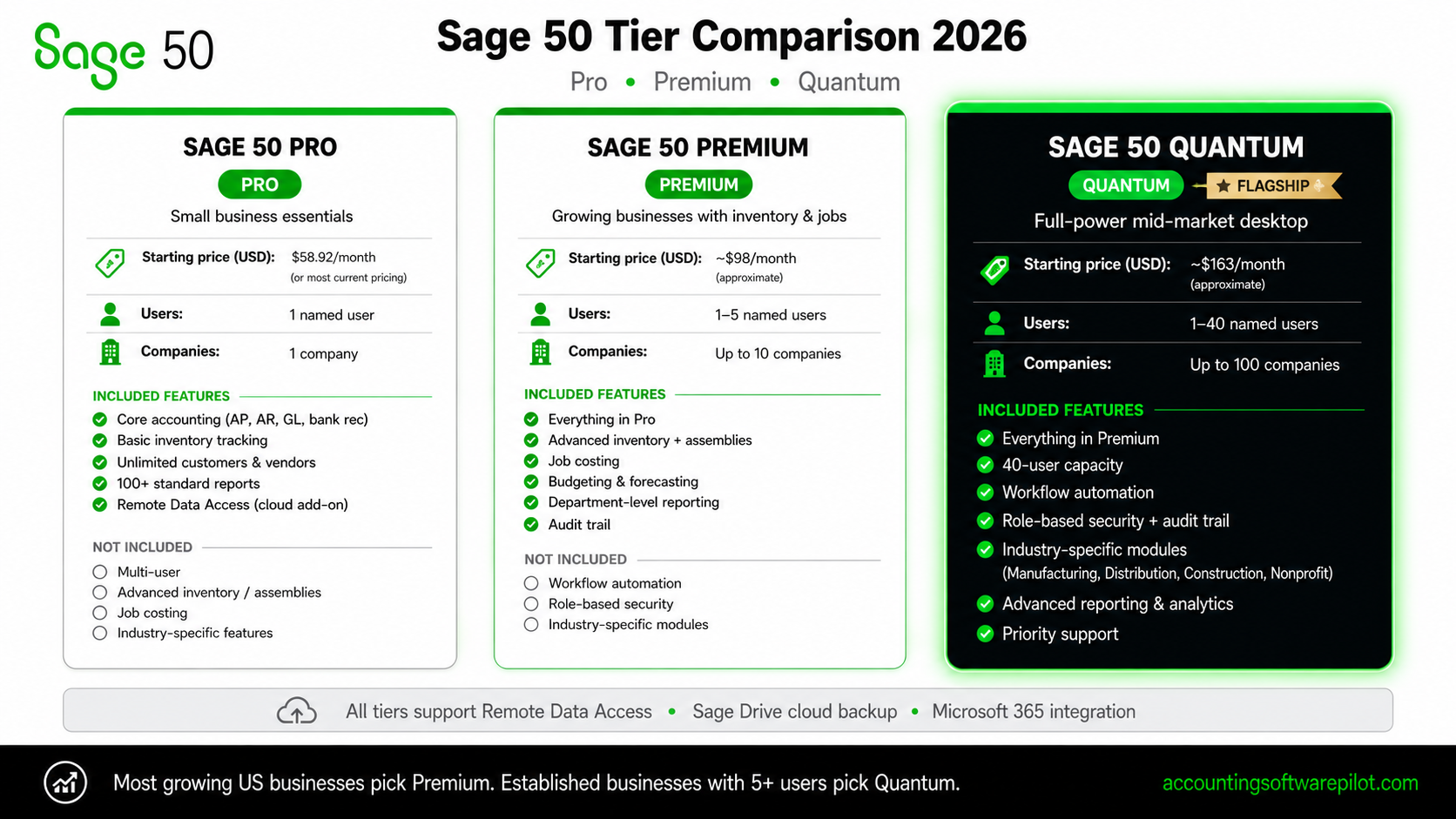
Tier | Approx. starting price | Users included | Best for |
|---|---|---|---|
Sage 50 Pro Accounting | ~$62/month (1 user) | 1 | Solo owners and very small businesses needing full desktop accounting plus cloud access |
Sage 50 Premium Accounting | ~$103/month (1 user), scales per seat | 1–5 | Growing businesses needing advanced budgeting, advanced inventory, and multi-company consolidation |
Sage 50 Quantum Accounting | Custom (starts ~$180/month for 1 user) | Up to 40 | Larger SMBs with multiple users, departments and heavier transaction volumes |
Pro tip: Sage regularly discounts new-customer subscriptions 40–50% for the first year. If you're migrating from QuickBooks Desktop, ask about the "switcher" promotions and whether your Sage reseller can bundle Remote Data Access or cloud hosting at no extra cost for the first year.
Core features across all Sage 50 tiers
Every Sage 50 tier includes the features most small businesses think of as "real accounting" — double-entry ledgers, bank feeds, invoicing, bill pay, sales tax, and customizable reports. What separates Sage 50 from the entry-level cloud tools is the depth under each of those modules.
Bank feeds and reconciliation: Automated bank feeds from thousands of US banks, with rule-based categorization and a fast reconciliation screen.
Invoicing and AR: Customizable invoice templates, recurring invoicing, customer statements, aged receivable reports, and online payment acceptance via Stripe-like integrations.
AP and bill pay: Vendor records, purchase orders, 1099 tracking and e-filing, and tight integration with Sage AP Automation for OCR and approvals.
Inventory: Even at the Pro tier, you get average-cost, LIFO, FIFO and specific-identification inventory tracking — rare among SMB tools.
Job costing: Phase and cost-code tracking make it a genuine contender for construction firms and service companies doing project work.
Reporting: 100+ prebuilt reports plus a customizable designer; export to Excel with live cell linking through the Microsoft 365 add-in.
Remote Data Access: Share a single Sage 50 company file across remote users via Sage's cloud layer, without running a full hosted-desktop environment.
What each tier adds
The tier decision is usually driven by three questions: how many users, how complex is inventory, and do you operate more than one legal entity?
Sage 50 Pro Accounting
Pro is the entry point and is genuinely functional for a real business — not a stripped-down demo. It's a one-user license that handles invoicing, expense tracking, bank reconciliation, 1099s, inventory at the basic tier, and financial reporting. For a solo contractor or a retail shop with one bookkeeper, Pro is often all that's needed.
Sage 50 Premium Accounting
Premium is where most multi-person US small businesses land. It adds:
Advanced budgeting across departments and periods
Advanced inventory, including assemblies, serialized inventory and multiple price levels
Multi-company consolidation — run up to 10 companies and produce a single consolidated P&L and balance sheet
Audit trails and internal accounting review
Up to 5 named users with concurrent access to the same company file
Sage 50 Quantum Accounting
Quantum is Sage 50's top tier and scales to 40 named users. It adds role-based security with granular permissions, workflow management, advanced job costing, and faster performance tuning on large data files. For businesses crossing the ~$5M revenue or 15+ employee mark, Quantum is typically where Sage 50 stops making sense and Sage Intacct becomes the better conversation — more on that below.
Sage 50 integrations and marketplace
One of Sage 50's quiet strengths in 2026 is its partner ecosystem. The Sage Marketplace lists hundreds of certified add-ons, and several first-party integrations materially expand what Sage 50 can do:
Integration | What it adds |
|---|---|
Sage AP Automation AI-powered | OCR bill capture, approval workflows, and ACH bill pay — eliminates most manual AP entry |
Avalara AvaTax | Automated US sales tax calculation across 13,000+ jurisdictions, nexus tracking, and return filing |
Microsoft 365 | Outlook contact sync, Excel live cell linking, OneDrive backup of company files |
Sage Payroll (powered by Gusto-style partner) | Full-service payroll with US federal, state and local tax filing plus W-2/1099 year-end |
Time tracking and CRM | Third-party apps like Timeslips, Method:CRM and BigTime for project-based service firms |
Strengths: where Sage 50 genuinely leads
In a 2026 market full of look-alike cloud accounting tools, Sage 50 stands out in a handful of very specific ways.
True desktop performance on large files. Data entry and reporting are noticeably faster than cloud tools once you have tens of thousands of transactions.
Inventory depth. Multiple costing methods, assemblies, serialized tracking and reorder points are available in the mid tier — QuickBooks Online charges extra and Xero relies on third-party add-ons.
Job costing. Construction contractors and specialty trades get real phase/cost-code tracking without a separate industry product.
Local data ownership. Your company file sits on your machine or your server. For firms with compliance or cybersecurity policies around data residency, this matters.
Natural path for QuickBooks Desktop migrants. Sage's conversion tool can import QBD lists and open transactions, and the interface paradigm is familiar enough to shorten the learning curve.
Weaknesses: where Sage 50 lags
A fair review has to be honest about the tradeoffs.
Not a true cloud product. Even with Remote Data Access, the experience is still Windows-first. Mac users need a hosted-desktop workaround.
Mobile experience is limited. The companion mobile app covers invoicing, expenses and customer lookups, but you can't run full workflows from a phone.
No native multi-currency in the US edition. If you invoice in multiple currencies, you'll need the Canadian edition, a workaround, or a different product.
Annual subscription required. You can no longer buy a perpetual license — the pricing model is now closer to a cloud tool even though the software isn't one.
UI feels dated. Compared to Xero's modern interface, Sage 50 still looks like classic Windows software. That's a feature for some users and a dealbreaker for others.
Note: If multi-currency, a modern mobile experience, or unlimited users are non-negotiable for your business, consider Sage's own cloud products — Sage Intacct for mid-market or Sage Accounting for micro-businesses — or Xero as a cross-shop.
Sage 50 vs QuickBooks Desktop, Xero and Wave
Here is how Sage 50 stacks up against the three products it most commonly gets compared with in US buyer shortlists.

Feature | Sage 50 | QuickBooks Desktop | Xero | Wave |
|---|---|---|---|---|
Deployment | Desktop + cloud hybrid | Desktop (discontinued for new buyers) | Cloud only | Cloud only |
Starting price | ~$62/month | No longer sold | $29/month | Free (paid add-ons) |
Advanced inventory | Included in Premium | Enterprise tier only | Via add-on | Not supported |
Job costing | Strong, built-in | Strong | Basic | Not supported |
Multi-company | Up to 10 (Premium) | Separate files | Separate subscriptions | Separate accounts |
Max users | Up to 40 (Quantum) | Up to 30 | Unlimited | Unlimited |
Ongoing availability | Active roadmap | End-of-life | Active | Active |
Who should choose Sage 50?
Sage 50 is not trying to be all things to all businesses. It is purpose-built for a specific buyer profile, and it does that profile better than any of its competitors in 2026.
Sage 50 is the right choice if you are:
A QuickBooks Desktop user who doesn't want to move to pure cloud — you want a desktop-first product with a real future roadmap.
An inventory-heavy business (distribution, light manufacturing, wholesale) that needs assemblies, serialized tracking or multiple costing methods.
A construction or specialty trade contractor using job costing with phases and cost codes.
A multi-entity owner-operator with up to 10 related companies who wants consolidated reporting without jumping to a mid-market ERP.
A firm with an in-house bookkeeper or controller who does accounting daily and benefits from desktop speed.
Look elsewhere if you are:
A freelancer or micro-business — Wave, Xero Early or QuickBooks Solopreneur will be cheaper and simpler.
A fully remote team that lives in Google Workspace and on Macs — Xero or QuickBooks Online will feel more native.
A multi-currency business selling internationally — Xero or Sage Intacct are better fits.
A mid-market company with 5+ entities, complex revenue recognition, or 50+ employees — move up to Sage Intacct or NetSuite.
Implementation and support
Sage 50 is straightforward to implement by small-business software standards. A typical new implementation takes 2–6 weeks if you're starting from a prior accounting system: install, set up the chart of accounts, import customers/vendors/items, enter opening balances, connect bank feeds, and parallel-run for one reporting period.
Sage provides phone, chat and knowledge-base support included with subscription; premium support and Sage Business Care plans add priority response and data-recovery services. A deep network of Sage-certified resellers and bookkeepers — the Sage Accountants Network — offers implementation, training and ongoing support, particularly valuable for QuickBooks Desktop migrations.
Pro tip: Budget for 6–12 hours of formal training across your bookkeeping team. The product is deep and self-teaching typically leaves significant feature value on the table, especially around inventory, job costing and the report designer.
Final verdict
Sage 50 in 2026 is a mature, feature-rich accounting platform that has modernized just enough to remain relevant in a cloud-dominated market. It's not the cheapest option, and it's not the prettiest. But for US small businesses that rely on desktop speed, real inventory, job costing or multi-company consolidation — and for the enormous population of QuickBooks Desktop users forced off that product — Sage 50 is genuinely the best-fit replacement available.
Overall: Sage 50 earns our recommendation for inventory-heavy small businesses, construction contractors, and QuickBooks Desktop migrants. Start with Pro if you're a one-person shop, step up to Premium for multi-company or advanced inventory, and choose Quantum only if you genuinely need 10+ concurrent users. If you're beyond that scale, look at Sage Intacct instead.
This article is for informational purposes only and does not constitute financial, tax or legal advice. Pricing, features and product availability are subject to change — always confirm current pricing and specifications with Sage or an authorized Sage reseller before making a purchase decision. Sage, Sage 50, Sage Intacct, QuickBooks, Xero and Wave are trademarks of their respective owners. Comparisons reflect publicly available information at the time of writing.


